
-
-6%
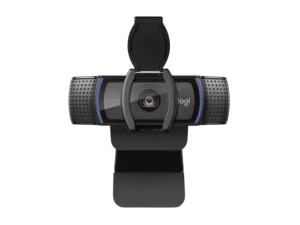
Logitech C920s HD Pro Webcam , 960-001252
Key Features
- Full HD 1080p Video
- Delivers crystal-clear video quality at 30 frames per second, making it ideal for high-quality calls and streaming.
- Auto-Focus
- Automatically adjusts focus to keep you sharp, even with movement, ensuring clear video at any distance.
- RightLight 2 Technology
- Automatic light correction helps provide clear video in any lighting condition, from dimly lit rooms to brightly lit environments.
- Dual Stereo Microphones
- Built-in stereo microphones capture natural audio, making communication crisp and clear.
- Privacy Shutter
- The integrated privacy shutter ensures your webcam lens is physically covered when not in use, offering additional privacy and security.
- Wide Compatibility
- Plug-and-play functionality with USB 2.0 connection, compatible with major operating systems and video apps.
- Versatile Mounting Options
- Adjustable clip for mounting the webcam to most devices, with a tripod-ready base for flexible setup.
- Portable and Compact Design
- Lightweight and easy to carry, ideal for remote work and video conferencing anywhere.
Logitech C920s HD Pro Webcam , 960-001252
Original price was: KSh 12,000.00.KSh 11,300.00Current price is: KSh 11,300.00.Original price was: KSh 12,000.00.KSh 11,300.00Current price is: KSh 11,300.00. Add to cart - Full HD 1080p Video
-
-9%
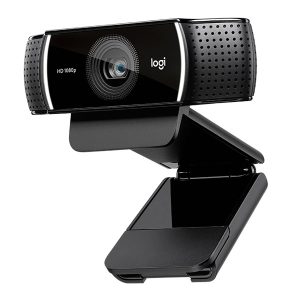
Logitech C922 Pro HD Webcam
Key Features
- 1080p Full HD Video at 30fps
- The C922 offers 1080p Full HD video at 30fps, delivering crisp, high-quality video for professional streaming, video calls, and conferencing. It also supports 720p at 60fps, which is perfect for those who want smoother, faster video for gaming and high-speed action scenes.
- Autofocus Lens
- The autofocus lens ensures your video stays sharp and in focus, even if you move around or adjust your position. This makes it ideal for both solo and group video calls or streams.
- Dual Built-in Microphones
- The webcam features dual microphones that capture stereo sound with noise-canceling technology, providing clear and natural audio. This ensures your voice sounds crisp, even in noisy environments.
- Automatic Light Correction
- The automatic light correction feature adjusts the webcam settings to optimize the video in various lighting conditions. Whether you're in a dark room or in bright sunlight, the webcam will adapt to provide the best possible image quality.
- Background Replacement and ChromaCam
- The C922 Pro HD offers background replacement features, including ChromaCam integration. This feature allows you to remove, blur, or replace your background during video calls or streams, making it a great option for streamers who want a professional look without a green screen.
- Wide 78° Field of View
- With a 78° diagonal field of view, the C922 is perfect for both personal and group video calls. It provides a wide enough view to fit multiple people in the frame while still maintaining a professional look.
- Tripod Compatibility
- The C922 comes with a tripod thread, allowing you to mount it on a tripod for added flexibility in positioning and stability. This feature is especially useful for streamers and content creators who need to set up their webcam in specific positions for optimal video quality.
- Plug-and-Play USB Connectivity
- The C922 connects via USB 2.0, offering plug-and-play functionality. Simply plug it into your computer, and it’s ready to go—no extra drivers or software required.
Logitech C922 Pro HD Webcam
Original price was: KSh 16,000.00.KSh 14,500.00Current price is: KSh 14,500.00.Original price was: KSh 16,000.00.KSh 14,500.00Current price is: KSh 14,500.00. Add to cart - 1080p Full HD Video at 30fps
-
-8%
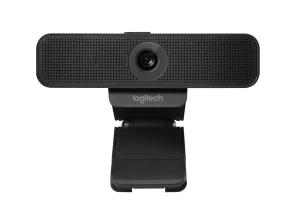
Logitech C925e Webcam
Key Features
- 1080p HD Video Quality
- The C925e delivers 1080p Full HD video at 30fps, providing crisp, clear video for professional video conferencing, webinars, and online meetings. The camera captures fine details and colors, ensuring a polished and professional appearance on screen.
- Autofocus
- Equipped with autofocus, the C925e ensures that your video is always in focus, whether you’re sitting still or moving around. This feature helps you maintain clarity even during dynamic video calls.
- Built-in Stereo Microphones
- The dual stereo microphones built into the webcam provide clear audio capture with noise reduction, reducing background noise for a better, more professional audio experience. This is ideal for ensuring that your voice is heard clearly during calls and conferences.
- Privacy Shutter
- The privacy shutter is a convenient feature that allows you to easily cover the camera lens when not in use. It ensures your privacy and adds an extra layer of security when the webcam is not actively being used.
- Wide Compatibility
- The C925e is compatible with Windows, macOS, Chrome OS, and Linux, as well as a wide range of video conferencing software like Zoom, Microsoft Teams, Skype, and more. It works with most systems that support USB webcams, offering flexibility and ease of use.
- Flexible Mounting Options
- The C925e webcam features an adjustable clip that can easily mount on laptops, monitors, or desktops. It also includes a tripod thread adapter, allowing you to attach the camera to a tripod for enhanced stability and flexibility in positioning.
- Plug-and-Play Functionality
- The webcam supports USB 2.0 for plug-and-play functionality, meaning you can connect it to your computer without needing to install drivers or additional software. This ensures a quick and hassle-free setup.
- Compact and Portable
- With a compact design, the C925e is easy to transport and store. It’s a great option for professionals who need to move between workstations or travel frequently, as it fits easily into laptop bags or briefcases.
Logitech C925e Webcam
Original price was: KSh 14,000.00.KSh 12,900.00Current price is: KSh 12,900.00.Original price was: KSh 14,000.00.KSh 12,900.00Current price is: KSh 12,900.00. Add to cart - 1080p HD Video Quality
-
-4%
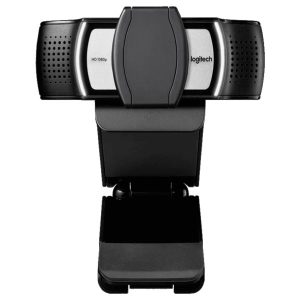
Logitech C930e Business Webcam , 960-000972
Key Features
- Full HD 1080p Video
- Provides crisp, high-definition video for professional video calls, conferences, and webinars.
- 90-Degree Wide-Angle Lens
- Captures a wide field of view, perfect for group video calls and capturing more of the background.
- Fixed Focus
- Delivers sharp and clear video from 50 cm to infinity, eliminating the need for constant adjustments.
- RightLight 2 Technology
- Automatic light correction adjusts for challenging lighting conditions, such as low light or backlighting.
- Stereo Microphones
- Dual built-in microphones capture natural, clear sound for professional-level audio during calls.
- Integrated Privacy Shutter
- Ensures privacy and security by physically covering the lens when not in use.
- Plug-and-Play Simplicity
- USB 2.0 connection provides quick setup and compatibility with most operating systems and business apps.
- Versatile Mounting
- Can be easily mounted on laptops, monitors, or tripods, offering flexible camera positioning.
Logitech C930e Business Webcam , 960-000972
Original price was: KSh 13,000.00.KSh 12,500.00Current price is: KSh 12,500.00.Original price was: KSh 13,000.00.KSh 12,500.00Current price is: KSh 12,500.00. Add to cart - Full HD 1080p Video
-
-5%
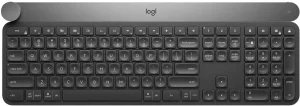
Logitech Craft Advanced Wireless Keyboard
Key Features
- Creative Input Dial (Crown)
- The standout feature of the Logitech Craft, the Crown, allows users to access specific functions in apps quickly. For example:
- Adjust brush size in Photoshop
- Switch between font sizes in Word
- Scrub timelines in Premiere Pro
- The dial is context-aware, meaning its functions change dynamically depending on the application you’re using.
- The standout feature of the Logitech Craft, the Crown, allows users to access specific functions in apps quickly. For example:
- Smart Backlighting
- The keyboard features ambient backlighting that adjusts based on your environment and turns on when it detects your hands.
- Dual Wireless Connectivity
- Seamlessly connect to up to 3 devices via Bluetooth or Logitech’s Unifying USB Receiver.
- Switch between devices using Easy-Switch keys.
- Premium Typing Experience
- The scissor-switch keys provide a quiet and precise typing experience with solid tactile feedback.
- Logitech Options Software
- Fully customize the keyboard, the Creative Input Dial, and shortcut keys to suit your workflow.
- Multi-Platform Support
- Compatible with Windows and macOS, ensuring smooth performance across devices and operating systems.
Logitech Craft Advanced Wireless Keyboard
Original price was: KSh 27,000.00.KSh 25,750.00Current price is: KSh 25,750.00.Original price was: KSh 27,000.00.KSh 25,750.00Current price is: KSh 25,750.00. Add to cart - Creative Input Dial (Crown)
-
-12%
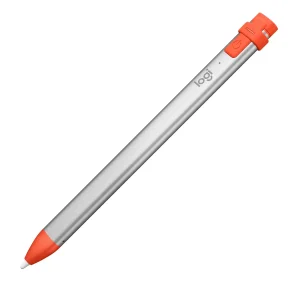
Logitech Crayon
Key Features
- Pixel-Perfect Precision
- Powered by Apple Pencil technology, the Logitech Crayon delivers accurate input for smooth writing, drawing, and marking.
- No Pairing Needed
- Simply turn it on and start writing – no Bluetooth pairing or setup required.
- Tilt Sensitivity
- Adjust line thickness naturally by tilting the Crayon, making it ideal for drawing and sketching.
- Long Battery Life with Quick Charge
- Enjoy 7.5 hours of continuous use, with a quick charge feature to get you back to work in no time.
- Comfortable, Durable Design
- The flat shape prevents rolling off surfaces, and the Crayon is built to survive classroom or workplace wear and tear.
- Universal Compatibility
- Works seamlessly with apps that support Apple Pencil input, such as:
- Notability
- GoodNotes
- Procreate
- Adobe Illustrator
- Works seamlessly with apps that support Apple Pencil input, such as:
Logitech Crayon
Original price was: KSh 5,000.00.KSh 4,400.00Current price is: KSh 4,400.00.Original price was: KSh 5,000.00.KSh 4,400.00Current price is: KSh 4,400.00. Add to cart - Pixel-Perfect Precision
-
-15%
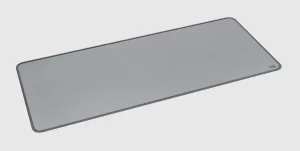
Logitech DeskMat 70cm x 30cm
Key Features
- Large Surface Area (70cm x 30cm)
- The 70cm x 30cm size provides plenty of space to accommodate your keyboard, mouse, and any other peripherals you may use. This larger surface ensures freedom of movement without feeling cramped, which is especially helpful for larger desks or setups with multiple devices.
- Smooth and Precise Tracking Surface
- The textured fabric surface ensures smooth and consistent mouse movement, optimizing precision for both work and gaming. Whether you're editing documents or playing fast-paced games, the DeskMat enhances your overall mouse performance.
- Comfortable Desk Space
- The DeskMat offers a comfortable resting place for your arms and wrists, reducing discomfort from extended keyboard and mouse usage. Its surface also protects your desk from scratches, spills, and dust.
- Non-Slip Rubber Base
- The non-slip rubber base keeps the DeskMat securely in place, preventing it from shifting during use. This stability is ideal for intense gaming sessions or work environments where movement can disrupt workflow.
- Easy to Clean
- The durable fabric surface is easy to wipe down and clean, helping you maintain a tidy and hygienic workspace with minimal effort.
Logitech DeskMat 70cm x 30cm
Original price was: KSh 4,000.00.KSh 3,400.00Current price is: KSh 3,400.00.Original price was: KSh 4,000.00.KSh 3,400.00Current price is: KSh 3,400.00. Add to cart - Large Surface Area (70cm x 30cm)
-
-9%
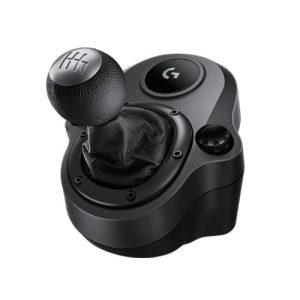
Logitech Driving Force Gear Shifter
Key Features
- H-Pattern Shifting
- The Logitech Driving Force Gear Shifter uses an H-pattern design, allowing you to shift through 6 forward gears and a reverse gear just like in real-world cars.
- This adds a layer of realism and immersion to your racing experience, particularly for racing simulators that support manual transmission.
- Durable Construction
- The steel shaft ensures the gear shifter’s durability and resilience over long gaming sessions.
- The leather-wrapped knob provides comfort, mimicking the feel of a real car's gear lever.
- Positive Shifting Feedback
- The gear shifter offers smooth, positive clicks between each gear, making shifting more precise and satisfying.
- This feedback helps you feel more connected to the car’s performance during races, allowing for quicker, more responsive shifts.
- Adjustable Mounting
- The gear shifter can be easily mounted to your racing rig or desk using the adjustable clamps, ensuring stability and security during use. This flexible mounting system allows you to customize your setup based on your preferences.
- Enhanced Racing Simulation
- The gear shifter adds a manual shifting experience, offering a more realistic driving experience by letting you manually control gear changes rather than using paddles or buttons. This makes the G29 and G923 wheels even more immersive for racing simulation games.
Logitech Driving Force Gear Shifter
Original price was: KSh 7,500.00.KSh 6,800.00Current price is: KSh 6,800.00.Original price was: KSh 7,500.00.KSh 6,800.00Current price is: KSh 6,800.00. Add to cart - H-Pattern Shifting
-
-14%
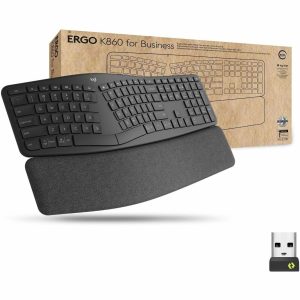
Logitech Ergo K860 for Business Wireless Ergonomic Keyboard
Key Features
- Advanced Ergonomic Design
- The K860 is designed with a split and curved keyframe that helps to promote a more natural typing posture. By reducing wrist and forearm strain, this ergonomic design helps to improve comfort and reduce the risk of repetitive strain injuries (RSI) over long periods of typing.
- Cushioned Palm Rest for Comfort
- The K860 features a soft, cushioned palm rest that provides support for the wrists during extended typing sessions. This reduces pressure on the wrists and helps prevent discomfort, making it ideal for those who type for long hours.
- Multi-Device Connectivity
- The K860 allows you to connect up to three devices via Bluetooth or the Logitech Unifying Receiver. With the Easy-Switch buttons, you can easily toggle between devices (such as a laptop, tablet, or smartphone) without needing to re-pair or disconnect.
- Long Battery Life
- Powered by two AAA batteries, the K860 can last up to two years on a single set of batteries, depending on usage. An LED battery indicator lets you know when it's time to replace the batteries, ensuring you're never caught off guard.
- Customizable Tilt Legs
- The keyboard is equipped with adjustable tilt legs that allow you to customize the typing angle to your preference, further improving ergonomic comfort and reducing wrist strain.
- Quiet and Responsive Typing
- The K860 features low-profile, responsive keys that offer a quiet and comfortable typing experience. The keys are designed to provide a tactile feel without creating excessive noise, making it suitable for both office and shared environments.
- Cross-Platform Compatibility
- The K860 is compatible with multiple platforms, including Windows, macOS, Chrome OS, iOS, and Android. Whether you're working on a desktop, laptop, tablet, or smartphone, the K860 offers seamless connectivity across different operating systems.
- Sustainable Design
- The K860 is designed with sustainability in mind, with key materials sourced responsibly, and the keyboard itself is built to last for extended periods, making it an environmentally friendly choice for businesses and individual users.
Logitech Ergo K860 for Business Wireless Ergonomic Keyboard
Original price was: KSh 22,000.00.KSh 19,000.00Current price is: KSh 19,000.00.Original price was: KSh 22,000.00.KSh 19,000.00Current price is: KSh 19,000.00. Add to cart - Advanced Ergonomic Design
-
-23%

Logitech F310 Wired Gamepad
Key Features
- Plug-and-Play Setup
- The USB wired connection makes setup incredibly easy. Simply plug the gamepad into an available USB port on your PC, and it’s ready to go—no software installation needed.
- Classic Controller Design
- The F310 features a familiar gamepad layout with the left and right analog sticks, D-pad, buttons (A, B, X, Y), and shoulder buttons (L1, R1), mimicking a traditional console controller. This makes it comfortable for users familiar with console gaming.
- Dual Analog Sticks and Triggers
- The dual analog sticks offer precise control for movement and camera manipulation, while the analog triggers provide responsive inputs, making it suitable for action games, shooters, and driving games.
- XInput and DirectInput Support
- The F310 supports both XInput (for newer games, such as those on Xbox) and DirectInput (for older games), making it versatile and compatible with a broad range of titles.
- Ergonomic Design
- The controller is designed for comfort during extended gaming sessions, with an ergonomically shaped body that reduces hand fatigue. The button layout is designed to minimize hand strain and improve responsiveness.
- 1.8 Meter Cable
- The 1.8-meter (5.9-foot) cable gives you plenty of room to sit back and enjoy your game without worrying about the controller's cable length.
- Customizable Controls
- The F310 comes with customizable button mappings through the Logitech Gaming Software, allowing you to personalize controls to suit your preferred play style.
Logitech F310 Wired Gamepad
Original price was: KSh 3,500.00.KSh 2,700.00Current price is: KSh 2,700.00.Original price was: KSh 3,500.00.KSh 2,700.00Current price is: KSh 2,700.00. Add to cart - Plug-and-Play Setup
-
-10%
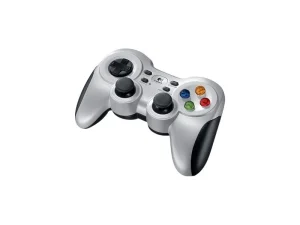
Logitech F710 Wireless Gamepad
Key Features
- Wireless 2.4 GHz Connection
- The F710 utilizes a 2.4 GHz wireless connection, offering a stable connection with minimal input lag and a wireless range of up to 10 meters (33 feet), providing more freedom during gameplay.
- Dual Vibration Feedback
- The dual vibration motors enhance the immersion by providing realistic feedback based on in-game events, such as explosions, collisions, and impacts, for a more engaging gaming experience.
- XInput and DirectInput Support
- The F710 is compatible with a wide range of games thanks to XInput (for newer games like Xbox controllers) and DirectInput (for older games), ensuring that it works with both modern and classic titles.
- Ergonomic and Comfortable Design
- The F710 has been designed with ergonomic grips to ensure comfort during extended gaming sessions. The controller’s layout is modeled after the traditional console controller, making it familiar and easy to use.
- Plug-and-Play Setup
- Simply plug the USB receiver into an available port on your PC, and you’re ready to start playing with no additional software required. The F710 is designed to be a plug-and-play device, offering a hassle-free setup.
- Long Battery Life
- The 2 AA batteries provide a long battery life, with up to 40 hours of continuous gaming time, and are easy to replace when needed.
Logitech F710 Wireless Gamepad
Original price was: KSh 5,000.00.KSh 4,500.00Current price is: KSh 4,500.00.Original price was: KSh 5,000.00.KSh 4,500.00Current price is: KSh 4,500.00. Add to cart - Wireless 2.4 GHz Connection
-
-30%

Logitech Flightstick Extreme 3D Pro
Key Features
- Ergonomic Design for Comfort
- The joystick’s design ensures comfort during long flight simulation sessions, reducing fatigue and allowing for more immersive gameplay.
- Twist Rudder Control
- The twist rudder control provides additional precision in controlling yaw for sharper turns and smooth maneuvers.
- Precise Throttle Control
- The throttle control allows for smooth and accurate adjustments in speed, making it easier to manage the plane's acceleration.
- Customizable Controls
- With 12 programmable buttons, players can assign a wide range of in-game functions, enhancing the flexibility and personalization of the flight experience.
- Plug and Play
- Easy installation
Logitech Flightstick Extreme 3D Pro
Original price was: KSh 10,000.00.KSh 7,000.00Current price is: KSh 7,000.00.Original price was: KSh 10,000.00.KSh 7,000.00Current price is: KSh 7,000.00. Add to cart - Ergonomic Design for Comfort
-
-12%
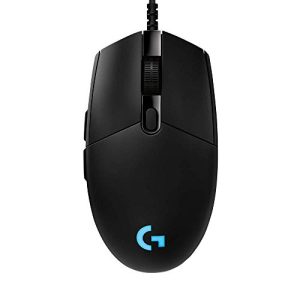
Logitech G Pro Wired Mouse HERO
Key Features
- HERO Sensor
- The G Pro features the HERO sensor, known for its precision, speed, and efficiency. It delivers a DPI range of 200 to 16,000 with zero smoothing or acceleration, ensuring fast and accurate tracking for all gaming scenarios.
- Ambidextrous Design
- The G Pro is designed with an ambidextrous shape, making it comfortable for both left- and right-handed users. This versatile design ensures that gamers can enjoy the mouse regardless of their hand preference.
- 6 Programmable Buttons
- The G Pro comes with six customizable buttons, including the DPI shift button. You can program these buttons through the Logitech G HUB software to create macros, shortcuts, and commands, enhancing gameplay efficiency.
- Lightweight Design
- Weighing just 85g, the G Pro is light and responsive, allowing for fast, precise movements, which is especially important for FPS and competitive gaming.
- Durability
- The G Pro is built to last with mechanical switches rated for 50 million clicks, making it a reliable choice for long gaming sessions and intense gameplay.
- Customizable RGB Lighting
- Personalize your mouse with RGB lighting. With 16.8 million colors available, you can set the mouse’s lighting to match your style or sync it with other Logitech G devices.
- Onboard Memory
- Store up to 5 game profiles directly on the mouse, allowing you to switch between settings quickly and use the same configuration across multiple devices, whether at home or at a gaming tournament.
- Precision Scroll Wheel
- The scroll wheel provides precise control and tactile feedback for gaming and general navigation, giving you extra accuracy when scrolling through game menus or documents.
Logitech G Pro Wired Mouse HERO
Original price was: KSh 8,500.00.KSh 7,500.00Current price is: KSh 7,500.00.Original price was: KSh 8,500.00.KSh 7,500.00Current price is: KSh 7,500.00. Add to cart - HERO Sensor
-
-4%
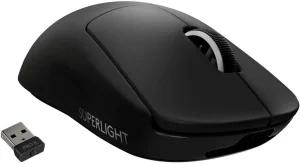
Logitech G Pro X Superlight Wireless Gaming Mouse
Key Features
- HERO Sensor
- The G Pro X Superlight uses the HERO sensor, providing ultra-precise tracking with a DPI range of 200 to 25,600. This sensor delivers one of the best tracking performances available, with zero smoothing, acceleration, or filtering.
- LIGHTSPEED Wireless Technology
- Logitech’s LIGHTSPEED wireless technology offers ultra-low latency and fast, reliable performance, giving you a wired-like experience without the need for cables.
- Ultra-Lightweight Design
- Weighing just 63 grams, the G Pro X Superlight is one of the lightest gaming mice available, allowing for faster and more fluid movements, ideal for professional gamers and esports enthusiasts.
- 5 Programmable Buttons
- The mouse includes 5 programmable buttons, allowing you to customize your mouse for quick access to in-game commands, macros, and shortcuts.
- Precision Scroll Wheel
- The scroll wheel offers precise control for gaming and general use, featuring tactile feedback for every step of movement.
- Customizable DPI Settings
- Adjust your DPI on the fly with the dedicated DPI shift button, allowing you to quickly switch between low and high sensitivity to suit your gaming style.
- Long Battery Life
- With up to 70 hours of battery life on a single charge (without RGB lighting), the G Pro X Superlight ensures that you can play uninterrupted for long gaming sessions.
- Comfortable and Ergonomic Design
- The shape of the G Pro X Superlight is designed for right-handed users, providing comfort and support during extended gaming sessions. Its lightweight build enhances responsiveness, making it suitable for all grip styles.
- Durability
- With mechanical switches rated for 50 million clicks, this mouse is built for durability and reliability, ensuring it will last through many gaming sessions.
Logitech G Pro X Superlight Wireless Gaming Mouse
Original price was: KSh 19,000.00.KSh 18,200.00Current price is: KSh 18,200.00.Original price was: KSh 19,000.00.KSh 18,200.00Current price is: KSh 18,200.00. Add to cart - HERO Sensor
-
-13%
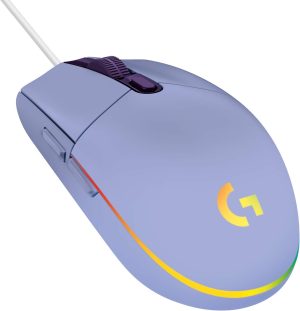
Logitech G102 LIGHTSYNC Corded Gaming Mouse – Lilac
Key Features
- LIGHTSYNC RGB Lighting
- Fully customizable RGB lighting with dynamic animations and synchronization with your game or music.
- Gaming-Grade Performance
- 8,000 DPI sensor for precise and smooth tracking across a variety of surfaces.
- 6 Programmable Buttons
- Personalize your setup by assigning macros and in-game commands using Logitech G HUB software.
- Durable and Lightweight
- Weighing only 85 grams, it’s designed for extended gaming sessions with minimal fatigue.
- Customizable Sensitivity
- Adjust DPI settings on the fly with an onboard DPI button for quick transitions between accuracy and speed.
- Responsive Performance
- 1ms polling rate ensures near-instantaneous response times for competitive gaming.
- Compact and Stylish Design
- A modern lilac finish adds a unique aesthetic to your gaming setup, paired with a small, comfortable shape.
Logitech G102 LIGHTSYNC Corded Gaming Mouse – Lilac
Original price was: KSh 4,000.00.KSh 3,500.00Current price is: KSh 3,500.00.Original price was: KSh 4,000.00.KSh 3,500.00Current price is: KSh 3,500.00. Add to cart - LIGHTSYNC RGB Lighting
-
-14%
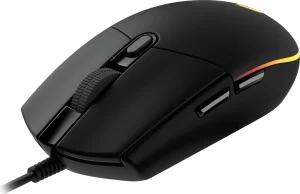
Logitech G102 LIGHTSYNC RGB 6 Button USB Gaming Mouse - Black , 910-005823
Key Features
- Gaming-Grade Performance
- 8,000 DPI adjustable optical sensor delivers pinpoint accuracy for gaming and general use.
- Customizable RGB LIGHTSYNC
- Dynamic, full-spectrum lighting that can sync with games, applications, or your setup via Logitech G HUB software.
- Classic 6-Button Layout
- Fully programmable buttons for efficient customization and quick in-game actions.
- Mechanical Button Tensioning
- Provides a crisp and reliable click response for fast-paced gameplay.
- Durable and Lightweight Design
- Built with high-quality materials to endure long gaming sessions while remaining lightweight for swift movements.
- On-the-Fly DPI Switching
- Instantly adjust DPI sensitivity levels with the dedicated DPI button.
- Plug-and-Play Compatibility
- Works out of the box for basic use, with customization available through Logitech G HUB software.
- Ergonomic Comfort
- Classic shape fits comfortably in most hand sizes, ideal for prolonged gaming.
- Affordable Price Point
- Premium performance at a budget-friendly cost, suitable for gamers looking to upgrade without overspending.
Logitech G102 LIGHTSYNC RGB 6 Button USB Gaming Mouse – Black , 910-005823
Original price was: KSh 3,500.00.KSh 3,000.00Current price is: KSh 3,000.00.Original price was: KSh 3,500.00.KSh 3,000.00Current price is: KSh 3,000.00. Add to cart - Gaming-Grade Performance
Logitech
Buy Logitech Mouse, Keyboards, Webcam, headsets and Video Confrence Accessories from Vention Kenya
 No products in the cart.